YAML to JSON [DEPRECATED]
This action is deprecated, meaning it is outdated and no longer maintained. It can still be used, but the updated version here (opens in a new tab) includes new features and bug fixes.
Usage
You can just paste in your YAML or open it from a file. It will be converted to JSON.
Input Arguments
| Input Argument | Type | Description | Required? | Advanced Option? | Default |
|---|---|---|---|---|---|
YAML | String in YAML format | The YAML code or a file containing YAML | ✔️ | ❌ | - |
Output
| Response | Type | Description |
|---|---|---|
JSON response | String | The JSON response from the YAML. |
Power Automate Examples
Simple YAML
We use a simple YAML with four pets
YAML response with our four pets
         Pet,Identifier,First name,Last name
         Dog,1000,Eats,A Lot
         Cat,1001,Likes,To Scratch
         Cat,1002,Furry,Kitty
         Duck,1003,Dagobert,Swimmy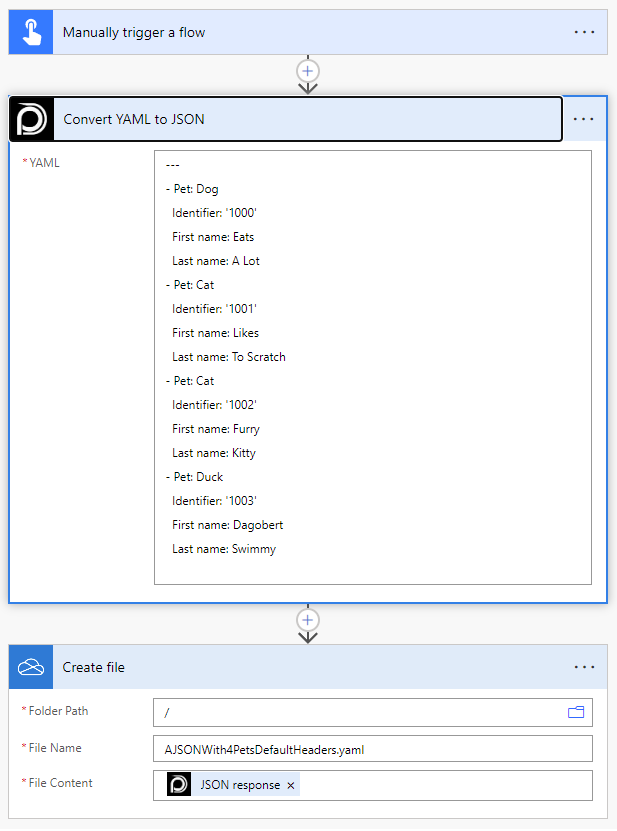
The JSON file saved to OneDrive (Create file) contains the JSON response shown above.
There are no options available in this action.
💡
Looking for the response of this example? If you scroll up you see a Output tab.
Power Apps Examples
Known Limitations
⚠️
If you experienced other limitations please get in touch with us!